When we talk about automation, we are not always talking about huge systems, major platform changes, or replacing full workflows. A lot of the time, the most useful automation is much more practical than that. It is taking something that already matters, something that is repetitive or time consuming, and finding a way to make that process more consistent, more visible, and easier to act on.
Like most software teams, we use a wide range of tools, frameworks, libraries, platforms, and services. Some of these are used directly on client projects, while others are part of our internal operations, development workflows, hosting environments, and, importantly, our approved software list. Keeping track of security related updates across all of those areas is important, but it can also become a very time consuming effort.
Security information can show up in a lot of different places. CVE databases, CISA known exploited vulnerabilities, GitHub security advisories, vendor updates, framework updates, and security news sites can all contain information that may or may not apply to the tools we use. The information is out there, but it is spread across a lot of sources, and not everything is relevant to us.
That is where automation can help. While there are off the shelf solutions for this, we wanted something that was light weight, leveraged our specific internal tools and did not have a lot of overhead/cost associated with it.
The Security Watch script scans a defined list of security sources, compares the results against the technologies and software we care about, and then outputs a readable HTML report. Instead of manually checking multiple sites, searching for the same tools over and over, and trying to keep track of what was reviewed, the script gives us a repeatable process and a consistent output.
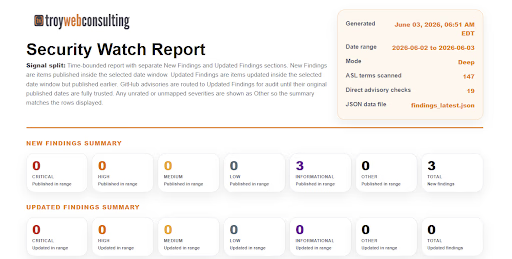
Figure 1: Security Watch Summary Output
The important thing here is that this does not replace human review, and it is not intended to. Someone still needs to look at the report, understand the context, determine what is actually relevant, and decide whether any follow up is needed. The automation simply helps get us to that point faster.
It gathers the information, organizes the results, shows what sources were checked, and shows what terms were scanned. That gives the team a better starting point than jumping between multiple websites and piecing everything together manually.
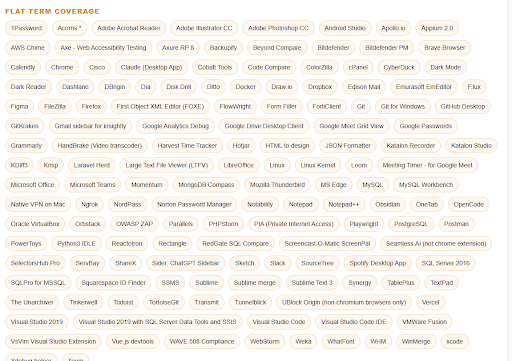
Figure 2: Security Term Coverage
This is the type of automation that we think is really valuable. It is not flashy, it is not overbuilt, and it is not automation just for the sake of saying we automated something. It is a focused solution to a real task that matters and takes significant time to perform manually.
The value is in making the process easier to repeat and easier to trust. Each time the script runs, we know what sources were checked, what terms were scanned, and what potential items were found. That consistency matters, especially with security related work, where you do not want the process to depend on someone remembering which sites they checked last time.
The Security Watch script is just one small example of practical automation. It helps us keep better visibility into security related information across the tools and technologies we use, gives our team a clearer report to review, and lets people spend less time collecting information and more time deciding what actually needs to be done.
That is where automation becomes useful.
Not when it replaces the work, but when it supports the work.
If you’re curious what this kind of disciplined, outside review looks like applied to your own systems, that’s the same rigor behind our Software Consulting & Assessment engagements — the kind of work we’ve done for clients like Grey Castle Security.

Share this article


